
SaaS Application Monitoring - What It Is, Why It Matters, and How to Get It Right
Key takeaways
- SaaS monitoring collects data from third-party apps to see what happens inside them.
- Although vendors manage the infrastructure, companies are responsible for their users, data, security, and configurations.
- Monitoring helps maintain performance beyond vendor SLAs, identifies configuration drift, reveals underutilized licenses, and ensures sensitive data remains secure and compliant.
- Avoid fragmented dashboards by integrating data from all SaaS applications into a single observability platform.
How many SaaS applications does your organisation use?
Take a moment. Think about it properly. Not just the obvious ones – Microsoft 365, Salesforce, ServiceNow. The smaller ones too. The HR system. The project management tool. The thing the finance team started using two years ago that nobody else knows about.
Now – how many of those are you actually monitoring?
Most people go quiet at that point.
What Is SaaS Application Monitoring?
Here’s the thing about SaaS applications. You don’t control them.
You don’t own the servers. You can’t install agents. You can’t get under the hood the way you can with infrastructure you run yourself. Traditional monitoring approaches don’t apply.
What you can do is collect the data the vendor gives you. APIs, audit logs, event streams, usage metrics, webhooks. Most enterprise vendors expose a reasonable amount of this. Some expose a lot. This data tells you what’s happening inside the application from your side. Who’s logging in, from where, what they’re accessing, what’s changing, what’s failing.
That’s SaaS monitoring. Visibility into applications you don’t control, using the data they choose to expose.
Worth being clear about what it isn’t. It isn’t APM. That’s for applications you build and run yourself, not theirs. And it isn’t just a log collection either. You can collect logs without understanding anything. Logs sitting in a system nobody looks at aren’t monitoring. They’re storage.
SaaS monitoring is the bit in between. Meaningful visibility. Actionable information. From applications your business actually depends on.
SaaS (Software as a Service) monitoring is about collecting and analysing data from third party applications running in that model, used in your company. Not all apps provide the same amount and type of data, so the key is to make use of the data that is available.
The Responsibility of the User
Now here’s the part most people haven’t properly thought about.
When you buy a SaaS application, the vendor manages the infrastructure. Servers, network, underlying platform. That’s their problem. And honestly, they’re usually quite good at it. That’s the whole point.
But here’s what they don’t manage.
What happens inside the application on your side. Who has access and what they’re doing with it. Whether your data is being handled the way you think it is. Whether your integrations are working. Whether someone is quietly exporting things they shouldn’t be.
That’s your responsibility. It always was. The SaaS model just made it easy to forget.
“They manage everything” turned into “we don’t need to monitor anything.”
These are not the same statement.
These are not the same statement.
The vendor manages the infrastructure. You manage everything above that. Your users, your data, your configurations, your security posture inside the application. The vendor’s status page won’t tell you any of it.
How SaaS Application Monitoring Works
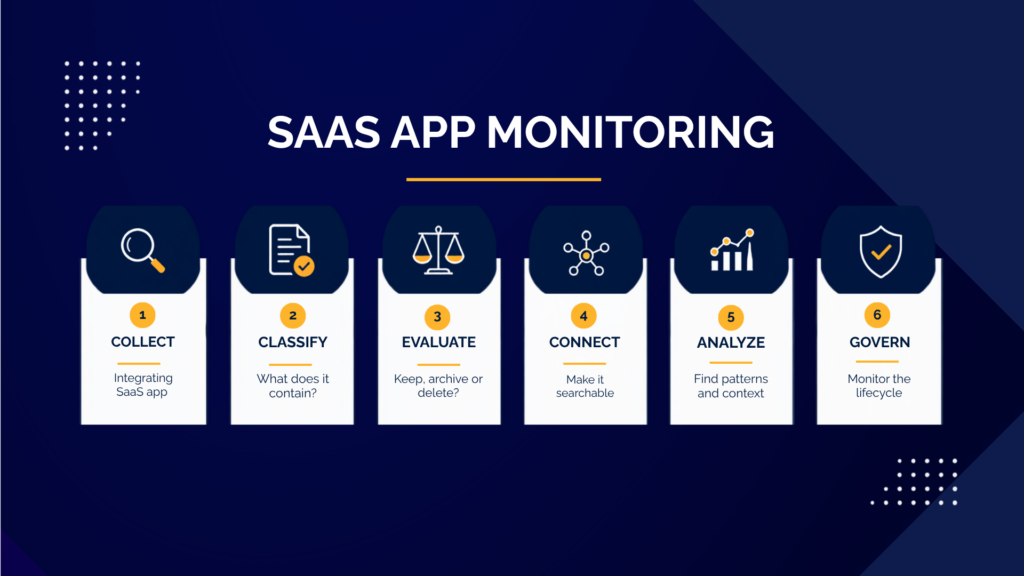
SaaS applications generate events constantly. User logins, file accesses, configuration changes, API calls, errors, licensing usage. It never stops. Most enterprise vendors expose this through APIs or log export functionality. A monitoring platform or a purpose-built connector collects it and sends it somewhere you can actually use it.
Raw data from Salesforce and raw data from Microsoft 365 look nothing like each other. Good platforms make them comparable. Without that, correlation is guesswork.
From there it goes into your observability platform where it sits alongside your infrastructure data, your security events, your application logs.
Observability enables log data from multiple sources/systems to be correlated in real time. Based on this data, we can extract abnormal behaviour and other predefined patterns, and use them to alert different parties and/or trigger automation.
Our go-to observability platform is Splunk. It’s built to ingest data from everywhere and correlate it across the whole environment. Purpose built add-ons for most major SaaS platforms, a Marketplace full of community built connectors for the rest.
The result is one view. Not a separate dashboard for every application. One place where you can see what’s happening across your entire environment – on-premises, cloud, and SaaS, at the same time.
When an incident spans your on-premises Active Directory and your Microsoft 365 environment, you want to see that story in one place. Not piece it together from two separate tools at two in the morning.
Observability Playbook
WeAre’s Observability Playbook is a practical guide for IT, DevOps, platform, and business teams that want to understand how observability helps improve visibility, reduce downtime, and connect technical performance to business outcomes. It explains how logs, metrics, and traces work together, why observability matters in modern distributed environments, how mature observability practices companies have, and how organisations can move step by step from reactive troubleshooting toward faster incident response, shared visibility, and stronger operational trust.
Why Companies Need SaaS Application Monitoring
Why does SaaS monitoring actually matter?
Because SaaS applications are critical infrastructure now. And critical infrastructure needs to be monitored.
Your SaaS applications hold sensitive data. Customer records, financial information, employee data. You need to know who’s accessing it, from where, and whether that looks normal. Many compliance frameworks now require it explicitly. The vendor’s certifications cover their infrastructure. Your compliance obligations cover how you use it.
And performance is your problem too. Vendor SLAs tell you what they commit to. They don’t tell you how the application performs for your specific users in your specific configuration. Slow performance, integration failures, synchronisation issues. These often don’t appear on the vendor’s status page. Because nothing is wrong on their side.
SaaS environments also drift. New integrations get added. Administrators make changes. Users find workarounds. Without monitoring, none of this is visible until something breaks. And SaaS licensing is expensive. Monitoring usage reveals inactive accounts, underutilised licences, applications nobody actually uses. Often a meaningful number.
And when something goes wrong – and something always does – you need to understand what happened. Without SaaS audit logs in your monitoring environment, you’re starting the investigation blind.
Key Features and Best Practices
What does ‘good’ actually look like?
- One platform, not ten dashboards. SaaS data should live alongside everything else. A separate tool for every application is not an observability strategy.
- Meaningful alerts. Based on behaviour that matters: anomalous access, privilege escalation, bulk exports, integration failures. Not raw event counts. Alerts without actions are just noise.
- Coverage that matches risk. Not every application needs the same depth. Identity provider, CRM, financial systems: monitor thoroughly. Project management tool: monitor appropriately. Start where the risk is highest.
Integrating Monitoring with Your SaaS Product
The practical question that most organizations face early on is how difficult this actually is.
Honest answer – it varies.
Major vendors like Microsoft, Salesforce, ServiceNow, Workday, Google have well-documented APIs and good log export. Splunk has purpose-built add-ons for most of them. Integration is configuration work, not development work. Smaller or more specialised applications vary. Some have excellent coverage. Some have almost nothing. A few are just frustrating.
A realistic programme starts with the highest-priority applications: identity, productivity, CRM. Then expands from there. Trying to monitor everything at once is a reliable way to monitor nothing well.
And be realistic about depth. SaaS monitoring gives you visibility into what the vendor exposes. That’s usually enough for security and operational purposes. For deep performance troubleshooting you’re dependent on what they provide – which varies.
The goal isn’t perfect visibility. It’s meaningful visibility. Enough to see what matters, investigate what goes wrong, and demonstrate compliance where required.
That’s achievable. It just requires taking the first step.
Summary
SaaS monitoring can help you monitor the performance, health, and usage levels of third-party applications. Although the vendor manages the entire infrastructure, part of the application on our end still requires monitoring.The scope of data we can monitor depends on the provider, but the whole process becomes much easier with advanced observability systems.
Contact us to learn about available options, or take our free assessment linked below.
Free Observability
Assessment and Consultation
30-minute expert consultation
Custom improvement roadmap
Detailed assessment report
Facebook
Twitter
LinkedIn