How WeAre Automated Renta’s Jira-to-Pull-Request Workflow with AI Agents, Splunk Monitoring, and Cost Controls | Case study
Key takeaways
- WeAre built an AI agent workflow that turns selected Jira tickets into reviewed pull requests for Renta Easy, Renta Task, and Renta Tools.
- Four specialised agents prepare requirements, write code, review changes, and test user flows. Engineers approve changes before merging.
- Splunk records each run’s activity, token usage, failures, and reported model costs, helping the team investigate problems and compare resource use.
- Time limits, capped retries, prompt caching, and temporary workspaces help control AI processing and infrastructure costs.
- The shared platform lets Renta extend AI-assisted development to additional applications without maintaining separate infrastructure for each.
Background
Renta is a Nordic construction equipment rental company that rents modern construction machinery, scaffolding, site units, and on-site services to B2B and B2C customers. Renta Easy provides the customer-facing rental service, while Renta Task and Renta Tools support equipment, depot, and fleet operations.
WeAre helped Renta automate the path from a selected Jira ticket to a reviewed pull request. The project focused on letting AI coding agents carry out development work without someone operating the tools throughout each run, while keeping the work traceable and its resource use controlled.
The workflow builds on .NET backends, web frontends, Jira tickets, Bitbucket repositories, and automated Playwright browser tests. In 2026, the team spent months refining agent roles and instructions locally using Claude Code, Anthropic’s command-line AI coding agent.
WeAre then brought this process into a shared cloud platform. The project combines WeAre’s software development, cloud engineering, and observability expertise to make AI-assisted development a controlled, measurable part of Renta’s engineering process.
The challenge
The agents could already handle selected tasks with a developer guiding them. The next step was to let the workflow run without someone manually starting each stage.
That required more than launching a coding agent in the cloud. Each product had different build processes, tests, and development rules. The platform needed to select the right application, prevent duplicate work, handle corrections, and stop when a task needed human attention.
WeAre also needed reliable records of failed and completed runs. Without those records, the team could not assess resource use or understand why a task had stalled.
Four AI agents with clear responsibilities
WeAre organised task preparation, coding, review, and testing into four roles. Each agent has its own instructions and service account.
| Agent | Responsibility |
|---|---|
| Product owner | Reads the selected ticket, adds acceptance criteria and technical context, and checks whether the task suits the agent workflow. |
| Developer | Implements the change on a separate branch, runs checks, and opens a pull request in Bitbucket. |
| Reviewer | Checks the proposed code against the requirements and posts review comments. |
| Tester | Starts the application and tests the changed user flow in a browser. |
The product owner prepares the task before development starts. Once the change is available, the reviewer and tester can work in parallel. Their feedback guides any corrections.
How a ticket becomes a pull request
A developer or product owner selects a ticket describing a software change and marks it ready for the agents.
Jira sends a notification to the dispatcher – a small coordinating program. It verifies the request, identifies the application, and checks available capacity. It also locks the ticket so two runs cannot work on it simultaneously.
If these checks pass, the dispatcher starts a temporary container. This isolated workspace contains a fresh copy of the code and the development tools. Credentials come from encrypted storage, while a local MySQL database and Valkey cache provide the application’s test dependencies.
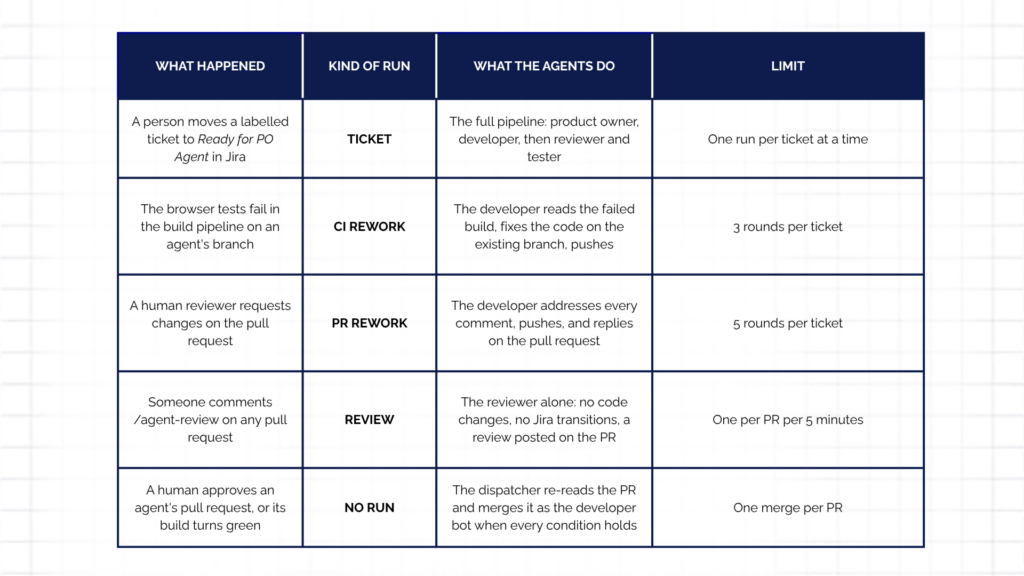
Claude Code reads the development instructions in the application’s repository and starts the appropriate stage. A new task begins with preparation. Correction runs resume from the stage that needs attention, using the current ticket and review feedback.
The developer agent opens a pull request, making the proposed change available for review and testing. An engineer approves changes before they are merged. After approval, the platform can merge an agent-authored pull request when no review tasks remain open, and the build is not failing. Releasing the change to customers is a separate step.
The workspace closes when execution ends. Code changes, review comments, and logs remain available in Bitbucket, Jira, and the logging systems.
Keeping the platform reusable
Each application keeps its build, testing, and review instructions in its own repository. This separates product-specific knowledge from the shared infrastructure.
The platform only needs to identify the product, locate its repository, and select the working branch. The agents read the remaining instructions alongside the code. Developers use those same instructions locally when testing changes to agent behaviour.
This design means that a change to one application’s build process does not require a separate version of the platform. Additional products can connect through configuration, repository access, and their existing development tools.
Monitoring AI agents with Splunk
Renta already used Splunk Cloud for application logs and alerts. WeAre extended this setup to include agent execution, giving the team one familiar place to investigate development runs.
Logs first go to AWS CloudWatch and are then indexed in Splunk. Each run produces an agent-stats record containing the task, product, duration, token usage, reported model cost, and exit status. The shutdown process also records failures and timeouts, so incomplete work remains visible.
These records help the team find tasks that need repeated attempts, investigate failed runs, and compare resource usage across products. Named service accounts provide a separate audit trail in Jira and Bitbucket, showing which role made each comment, status change, or pull request.
The approach builds on the operational visibility described in our log and data management with Splunk case study.
For organisations exploring broader AI cost visibility, Splunk AI Token and Cost Monitoring provides dashboards for analysing usage and costs across agents, models and providers. The Renta implementation described here uses custom run logs in Splunk Cloud.
Controlling AI development costs
WeAre addressed three sources of unnecessary spending: prolonged execution, repeated processing and idle infrastructure.
Each run has a 90-minute time limit, with up to three runs active across the products. Correction attempts are capped, after which a person takes over. Within one run, the workflow allows two correction rounds before handing unresolved work back.
The temporary workspace, database, and cache shut down together. This keeps infrastructure costs low between tasks and gives the next run a clean starting point.
The team also enabled prompt caching, which lets the model reuse previously processed instructions and context at a lower input cost. The five-minute cache often expired while builds or browser tests were running. Extending it to one hour kept that context available between development steps.
In one recorded run, the agent read over a million tokens from cache and only a few thousand fresh input tokens. Where enabled, a searchable code index also helps agents locate relevant code before reading files in detail.
Checking estimates against actual spending
To understand the cost, the team combines actual model spending from the Anthropic invoice with usage records in Splunk and work recorded in Git history. Together, these sources help estimate how spending is distributed across development tasks and reviews, and show what work the agents performed.
Monthly reporting therefore uses three sources:
| Source | Purpose |
|---|---|
| Anthropic invoice | Establishes actual model spending. |
| Splunk run records | Shows usage patterns, differences between runs, and unusually expensive attempts. |
| Git history | Identifies tickets worked on and pull requests merged. |
This gives the team a basis for assessing cost and activity while accounting for the human review involved.
The outcome: less manual coordination, clearer cost visibility
Selected tasks can now progress from ready tickets to reviewed pull requests across three Renta applications without a developer operating the tools throughout each run. Engineers review the proposed changes and retain approval responsibility.
Renta also has evidence to assess how the workflow performs. Run records reveal failures and repeated attempts, while invoice checks establish actual model spending. Execution limits bound resource use, and caching reduces the cost of repeatedly processing the same context.
The shared design reduces the need to maintain separate automation for each product. It gives Renta a foundation for extending AI-assisted development to more suitable tasks and applications as their instructions and tools are prepared.
For WeAre, the project demonstrates an AI-native approach grounded in engineering: agents work within existing development processes, supported by automated testing, cloud infrastructure, and observability.
“WeAre Solutions Oy is a reliable partner with strong expertise. They adapt to our current needs in the ever-changing world of software development, and they always make an effort to understand our requirements. By integrating AI agents into our Jira workflows and Splunk observability, we have significantly reduced the need for manual coordination while maintaining total control over code quality and costs. The team did an excellent job of introducing AI engineering, and we look forward to continuing this partnership.”

Frequently asked questions
- Which tasks are suitable for this workflow?
The workflow handles selected, well-defined software changes. The product owner agent checks whether the requirements and technical context are sufficient before the task proceeds.
- What happens when an agent is blocked?
It marks the ticket as Blocked, needs human intervention, and stops. A person investigates and decides how to continue.
- What prevents agents from repeatedly triggering each other?
The dispatcher filters out bot activity before starting work. It also acknowledges deliberately skipped requests with a reason, preventing connected systems from retrying them unnecessarily.
- What AWS infrastructure supports the platform?
The stack includes a container cluster, a task definition, a serverless dispatcher, a state table, encrypted parameters, and a CloudWatch log group. Jira, Bitbucket, and the build pipeline send notifications to the same dispatcher address.
- How are the development tools maintained?
Two container images separate the toolchain from the run scripts. The base contains .NET SDK, Node, Playwright with Chromium, and Claude Code. A smaller layer contains the scripts, allowing script changes to rebuild in about a minute.
- How does the team keep agent logs useful?
Database and cache output go to separate log streams. Noisy code-indexing output is written to a file, with one marker in the main log. CloudWatch retains logs for 14 days, while Splunk holds the longer-term history. - What is needed to connect another application?
The application needs repository-based development instructions, a product configuration entry, webhook and build-pipeline connections, and repository access for the service accounts. The shared infrastructure stays the same.